xpUnwrap
Phase Unwrapping on GPU (and CPU), with Python
There are many phase unwrapping algorithms out there. Many are implemented in CUDA, C++ etc. I haven’t yet found any algorithm that interfaces easily with Python via the wonderful GPU-based package CuPy. Please inform me if you know of one that is open-source.
This package aims to make GPU-based phase unwrapping in Python seamless. If you don’t have a GPU, don’t worry, all the code works on the CPU (albeit slower).
What does “xp” stand for?
The xp in xpUnwrap references several things:
CuPy’s agnostic code idea where
cpis for cupy andnpis for numpy.the “G” in GPU and “C” in CPU.
the “Q” from QPI (Quantitative Phase Imaging) e.g., from the sister package qpretrieve.
Installation
    # if you have the CUDA Toolkit version 12x use:
    pip install xpunwrap[cupy-cuda12x]

    # if you have the CUDA Toolkit version 13x use:
    pip install xpunwrap[cupy-cuda13x]

    # to install and just use on the CPU, just don't use any optional dependencies:
    pip install xpunwrap

    # to also use skimage's unwrap (CPU-only):
    pip install xpunwrap[scikit-image]

    # for faster CPU Fourier transforms via pyFFTW:
    pip install xpunwrap[FFTW]
On the CPU backend, xpunwrap automatically uses pyFFTW for the Fourier
transforms in the least-squares solvers when it is installed, falling back to
NumPy otherwise. On the GPU backend, CuPy’s FFT is always used.
Compatible Phase Retrieval and Numerical Refocusing GPU packages
In the same group on GitHub, we have two other packages that work seamlessy
with xpunwrap.
Phase Retrieval that works on CPU and GPU: qpretrieve
Numerical Refocussing that works on CPU and GPU: nrefocus
If you are looking for a file format that can also work with the GPU, try out zarr-python
Documentation and Citations
Check out the Documentation and Examples here: https://xpunwrap.readthedocs.io/
Using xpunwrap
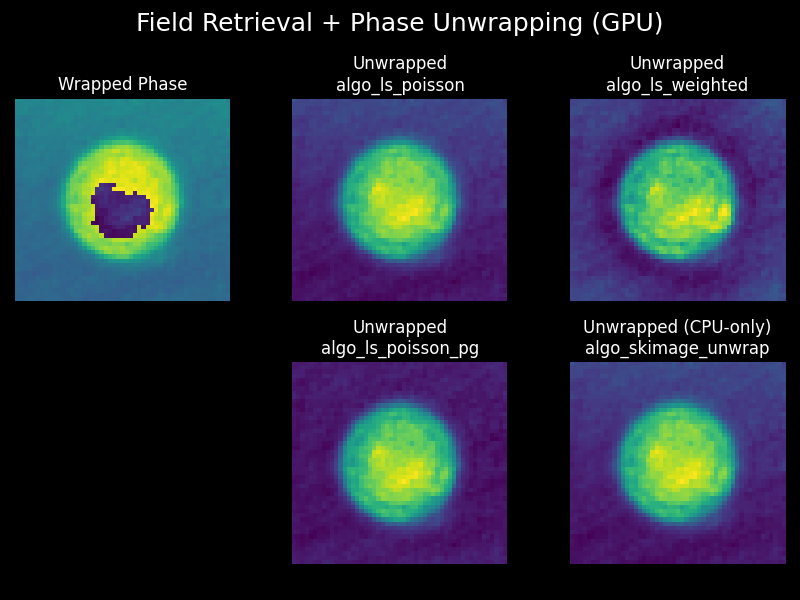
There are several phase unwrapping algorithms to choose from:
algo_ls_poisson: Least-squares Poisson solveralgo_ls_poisson_pg: Least-squares unwrapping with periodic gradient enforcementalgo_ls_weighted: Weighted least-squares unwrapping with border maskingalgo_skimage_unwrap: Scikit-Image’s Path Following algorithm (Herraez et al.) is included for comparison. It only works on the CPU, as it is not suitable for use with GPU.
"""
Field retrieval (qpretrieve) and phase unwrapping (xpunwrap) on GPU.
"""

import matplotlib.pyplot as plt
import numpy as np
import qpretrieve
import xpunwrap

# Force GPU backend for both libraries.
qpretrieve.set_ndarray_backend("cupy")
xpunwrap.set_ndarray_backend("cupy")
xp = xpunwrap.get_ndarray_backend()

fft_interface = qpretrieve.fourier.FFTFilterCupy
edata = np.load("./data/hologram_cell.npz")
holo = qpretrieve.OffAxisHologram(edata["data"], fft_interface)
bg = qpretrieve.OffAxisHologram(edata["bg_data"], fft_interface)

holo.run_pipeline(filter_name="disk", filter_size=1 / 2, scale_to_filter=True)
bg.process_like(holo)
phase_wrapped = xp.asarray(holo.phase - bg.phase).astype(xp.float32)

# Unwrap the phase with all available algorithms
outputs = {}
for algo_name, algo in xpunwrap.algos_available().items():
    outputs[algo_name] = algo(phase_wrapped)
skimage_out = outputs.get("algo_skimage_unwrap", None)
if skimage_out is not None:
    outputs_no_skimage = {k: v for k, v in outputs.items() if k != "algo_skimage_unwrap"}
else:
    outputs_no_skimage = outputs

# plot the wrapped and unwrapped phases
plt.style.use("dark_background")
fig, axes = plt.subplots(2, 3, figsize=(8, 6))
fig.suptitle("Field Retrieval + Phase Unwrapping (GPU)", fontsize=18)
axes = axes.flatten(order="F")

axes[0].imshow(phase_wrapped.get()[0])
axes[0].set_title("Wrapped Phase")

# With column-major flattening, bottom-right is index 5.
skimage_ax = axes[5]

# Fill remaining non-skimage algorithms first (slots 1..4).
plot_slots = [2, 3, 4]
for slot, (algo_name, arr) in zip(plot_slots, outputs_no_skimage.items()):
    ax = axes[slot]
    ax.imshow(arr.get()[0])
    ax.set_title(f"Unwrapped\n{algo_name}")

if skimage_out is not None:
    skimage_ax.imshow(skimage_out.get()[0])
    skimage_ax.set_title("Unwrapped (CPU-only)\nalgo_skimage_unwrap")
else:
    skimage_ax.text(0.5, 0.5, "skimage missing", ha="center", va="center")
    skimage_ax.set_title("Unwrapped\nalgo_skimage_unwrap")

for ax in axes:
    ax.set_axis_off()

plt.tight_layout(w_pad=4.5)
# plt.savefig("gpu_field_retr_phase_unwrapping.png")
plt.show()
Developers
Install everything you need with (for example for cuda12x)
pip install -e .[cupy-cuda12x] --group dev
Run the unit tests with pytest
pip install --group tests
pytest tests
Build docs with sphinx
pip install --group docs
cd docs
sphinx-build . _build
Check the docs locally by opening docs/_build/index.html file in your browser.
Package management with uv
If you wish to use uv to handle package management, then you need to first
install uv and then run:
For example, for the optional cupy-cuda12x
uv sync -active --all-groups --all-extras
Which should install all dev dependencies.
Other phase unwrapping packages
Here are several phase unwrapping packages that exist in Python:
https://github.com/blakedewey/phase_unwrap (CPU)
Scikit-image (CPU)
Use of AI
This package used Codex (mostly 5.4-Mini) to translate the source citations (see documentation website) into Python code, as well as the mathematical derivations. All code and documents were then human-verified and verified with Claude Opus, and tested against known input data.
Installation
    # if you have the CUDA Toolkit version 12x use:
    pip install xpunwrap[cupy-cuda12x]

    # if you have the CUDA Toolkit version 13x use:
    pip install xpunwrap[cupy-cuda13x]

    # to install and just use on the CPU, just don't use any optional dependencies:
    pip install xpunwrap

    # to also use skimage's unwrap (CPU-only):
    pip install xpunwrap[scikit-image]

    # for faster CPU Fourier transforms via pyFFTW:
    pip install xpunwrap[FFTW]
On the CPU backend, xpunwrap automatically uses pyFFTW for the Fourier
transforms in the least-squares solvers when it is installed, falling back to
NumPy otherwise. On the GPU backend, CuPy’s FFT is always used.
Compatible Phase Retrieval and Numerical Refocusing GPU packages
In the same group on GitHub, we have two other packages that work seamlessy
with xpunwrap.
Phase Retrieval that works on CPU and GPU: qpretrieve
Numerical Refocussing that works on CPU and GPU: nrefocus
If you are looking for a file format that can also work with the GPU, try out zarr-python
Documentation and Citations
Check out the Documentation and Examples here: https://xpunwrap.readthedocs.io/
Using xpunwrap
There are several phase unwrapping algorithms to choose from:
algo_ls_poisson: Least-squares Poisson solveralgo_ls_poisson_pg: Least-squares unwrapping with periodic gradient enforcementalgo_ls_weighted: Weighted least-squares unwrapping with border maskingalgo_skimage_unwrap: Scikit-Image’s Path Following algorithm (Herraez et al.) is included for comparison. It only works on the CPU, as it is not suitable for use with GPU.
"""
Field retrieval (qpretrieve) and phase unwrapping (xpunwrap) on GPU.
"""

import matplotlib.pyplot as plt
import numpy as np
import qpretrieve
import xpunwrap

# Force GPU backend for both libraries.
qpretrieve.set_ndarray_backend("cupy")
xpunwrap.set_ndarray_backend("cupy")
xp = xpunwrap.get_ndarray_backend()

fft_interface = qpretrieve.fourier.FFTFilterCupy
edata = np.load("./data/hologram_cell.npz")
holo = qpretrieve.OffAxisHologram(edata["data"], fft_interface)
bg = qpretrieve.OffAxisHologram(edata["bg_data"], fft_interface)

holo.run_pipeline(filter_name="disk", filter_size=1 / 2, scale_to_filter=True)
bg.process_like(holo)
phase_wrapped = xp.asarray(holo.phase - bg.phase).astype(xp.float32)

# Unwrap the phase with all available algorithms
outputs = {}
for algo_name, algo in xpunwrap.algos_available().items():
    outputs[algo_name] = algo(phase_wrapped)
skimage_out = outputs.get("algo_skimage_unwrap", None)
if skimage_out is not None:
    outputs_no_skimage = {k: v for k, v in outputs.items() if k != "algo_skimage_unwrap"}
else:
    outputs_no_skimage = outputs

# plot the wrapped and unwrapped phases
plt.style.use("dark_background")
fig, axes = plt.subplots(2, 3, figsize=(8, 6))
fig.suptitle("Field Retrieval + Phase Unwrapping (GPU)", fontsize=18)
axes = axes.flatten(order="F")

axes[0].imshow(phase_wrapped.get()[0])
axes[0].set_title("Wrapped Phase")

# With column-major flattening, bottom-right is index 5.
skimage_ax = axes[5]

# Fill remaining non-skimage algorithms first (slots 1..4).
plot_slots = [2, 3, 4]
for slot, (algo_name, arr) in zip(plot_slots, outputs_no_skimage.items()):
    ax = axes[slot]
    ax.imshow(arr.get()[0])
    ax.set_title(f"Unwrapped\n{algo_name}")

if skimage_out is not None:
    skimage_ax.imshow(skimage_out.get()[0])
    skimage_ax.set_title("Unwrapped (CPU-only)\nalgo_skimage_unwrap")
else:
    skimage_ax.text(0.5, 0.5, "skimage missing", ha="center", va="center")
    skimage_ax.set_title("Unwrapped\nalgo_skimage_unwrap")

for ax in axes:
    ax.set_axis_off()

plt.tight_layout(w_pad=4.5)
# plt.savefig("gpu_field_retr_phase_unwrapping.png")
plt.show()
Developers
Install everything you need with (for example for cuda12x)
pip install -e .[cupy-cuda12x] --group dev
Run the unit tests with pytest
pip install --group tests
pytest tests
Build docs with sphinx
pip install --group docs
cd docs
sphinx-build . _build
Check the docs locally by opening docs/_build/index.html file in your browser.
Package management with uv
If you wish to use uv to handle package management, then you need to first
install uv and then run:
For example, for the optional cupy-cuda12x
uv sync -active --all-groups --all-extras
Which should install all dev dependencies.
Other phase unwrapping packages
Here are several phase unwrapping packages that exist in Python:
https://github.com/blakedewey/phase_unwrap (CPU)
Scikit-image (CPU)
Use of AI
This package used Codex (mostly 5.4-Mini) to translate the source citations (see documentation website) into Python code, as well as the mathematical derivations. All code and documents were then human-verified and verified with Claude Opus, and tested against known input data.